





donald brooke
Fantastic Service! They really care about their customers. Michelle was fantastic! I would recommend the service to anyone needing a visa.
Quick answer: Bring three things: your current passport, signed and valid for at least six more months with a blank visa page; your most recent China visa and the passport it is in, if you have one; and a printed COVA confirmation page. Paper, not a phone screen — the counter scans the barcode on it. Washington, D.C. requires one extra element on that printout.
When your China visa application clears its online review, COVA flips to "Passport to be submitted" — and the online part is over. Someone now has to appear at the Chinese consulate that serves your state with the physical passport. If that someone is you, bring three things: your current passport, your most recent China visa (and the passport it's in), and a printout of your COVA confirmation page. This guide covers all three — including how to actually print that page, and the one way Washington, D.C. is different.
If you would rather not make the consulate trip yourself, a private agency can submit for you. Here is how to choose the best China visa service.
Your current passport. The one the visa will go into — signed, valid for at least six more months, with a blank visa page. This is what you are physically handing over; it stays at the consulate until the visa is decided.
Your most recent China visa — and the passport it's in. The application asks about your visa history, and officers check it against the real thing. If your last China visa lives in an expired passport, bring both passports — the old one with the visa and the new one being submitted. First-time applicants can skip this one.
A printout of your COVA confirmation page. Paper, not a phone screen — the consulates' own instructions say to bring a printed copy, and the barcode on it is how the counter pulls up your application.
After you filed on COVA, your application has a detail page in the portal. That page is your confirmation page, and a usable printout shows three things at once:
"Passport to be submitted" as the blue, active step in the progress row. If it's still grey, your application isn't ready — don't make the trip yet (more on this below).
The application barcode, fully visible and sharp.
The applicant's name, further down the same page.
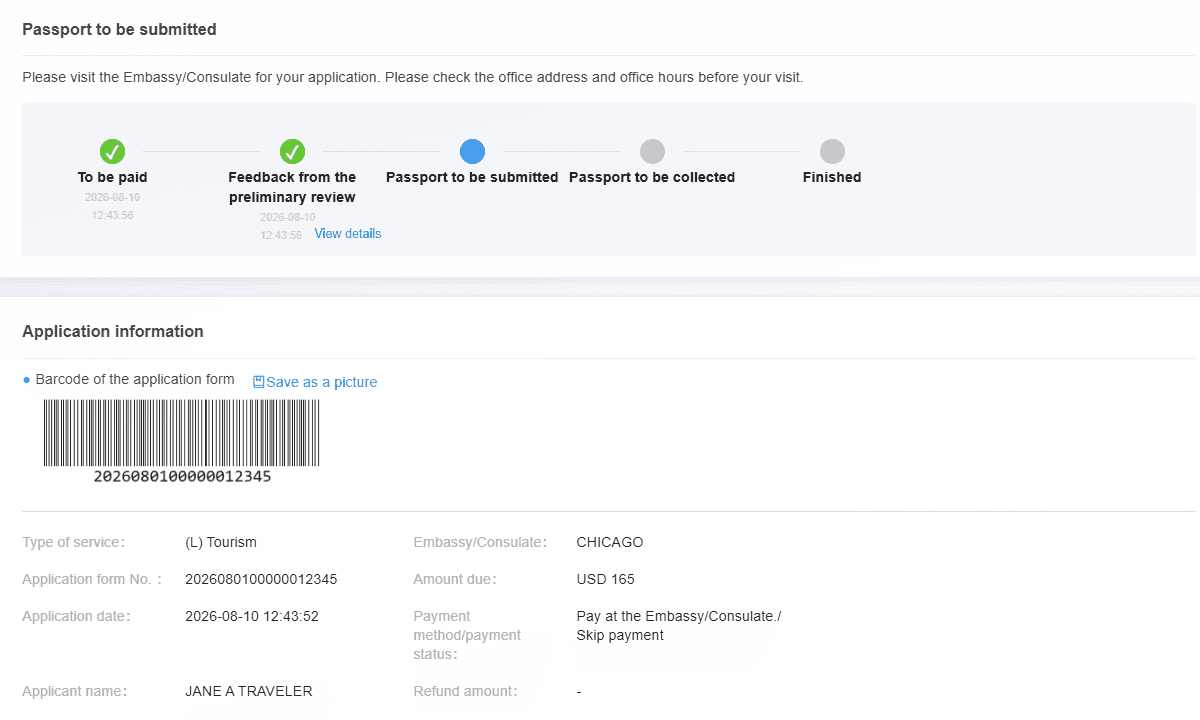
Example only — the name and number above are made up.
The D.C. embassy's confirmation page carries an extra blue button: "Additional reminders from the consul." Resting your mouse on it pops open a message from the embassy — and your printout should show that message open, because the embassy expects to see it.
Since a hover message disappears the moment you move the mouse, print it in two steps: keep the mouse on the button and capture the screen — Win + Shift + S on Windows, Cmd + Shift + 4 on a Mac — then print the capture.
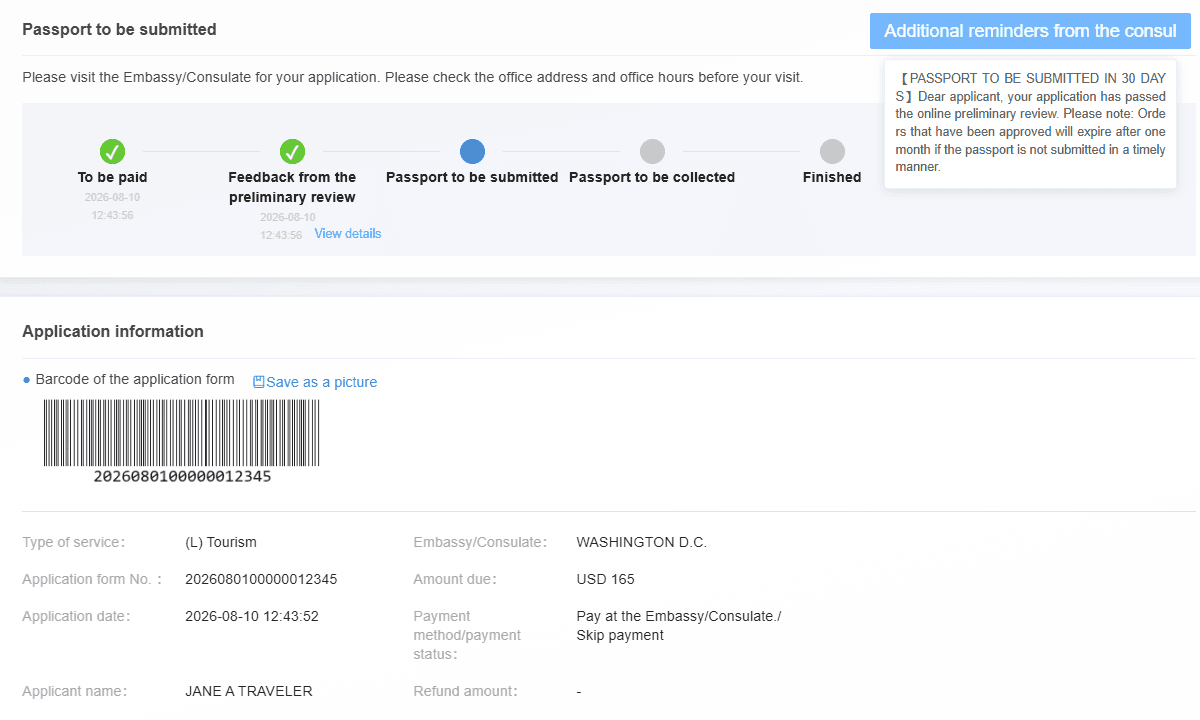
Example only — the name and number above are made up.
Use a computer, not your phone — you'll be juggling a sign-in, a zoom level and a printer.
Sign in at consular.mfa.gov.cn with the email and password you used when you filed.
Solve the picture puzzle. Click the small icons on the photo in the order shown along the top. The instruction may be in Chinese — 请依次点击 just means "click these in order."
Enter the emailed code. COVA emails a verification code on every sign-in, from zgls@webmail.mfa.gov.cn, and it expires in 5 minutes. Can't find it? Search your inbox for "zgls" and check spam.
Open "Track the status of my application" — the rightmost of the three cards — and press Click to enter.
Find your application and press "View details" in the bottom-right corner of its box. Applications are listed newest first.
Zoom until everything fits, then print. Hold Ctrl and press − (Mac: Cmd −) until the blue status, the barcode and the name are all on screen, then print the page with Ctrl + P (Mac: Cmd + P). If the print preview cuts something off, take a screenshot instead and print that. D.C. applicants: capture with the consul's message showing, as above.
Grey means the consulate hasn't finished its preliminary review — we measure that stage monthly; it typically runs a few business days. COVA won't email you when it changes, so sign in and check once a day. And whatever you do, don't file a second application while you wait — one passport gets one open application, and a duplicate locks the first. Every status label is decoded in our COVA status guide.
The D.C. reminder message spells out something that catches people everywhere: an approved application expires if the passport isn't submitted within about a month. Once your status turns blue, the clock is running — plan the consulate trip promptly rather than leaving it for "some week soon."
Your passport has to go to the consulate that serves your state of residence — not whichever is closest or most convenient. Look up your consulate by state here, and if you think you may have filed under the wrong one, read this before your trip.
Consulates take passport submissions in person, on weekday mornings, and an incomplete stack of documents means going home and coming back. If that trip is the part you'd rather skip: with our Full Service, we prepare and monitor the application and your passport is submitted in person at the consulate that serves your state — and if you've already filed on COVA yourself, our Courier Only service covers just the submission legwork. See your exact price in about 90 seconds, or call (708) 360-7277 with your status on the screen and we'll tell you where you stand.
Get My Passports is a private company that provides China visa application assistance. We're not affiliated with or endorsed by any government agency, and all visa decisions — type, validity, entries, and approval — are made solely by the Chinese consulate. Requirements can vary by consulate and change over time; confirm the current rules before your visit.
Can I show the COVA confirmation page on my phone instead of printing it?
Bring paper. The consulates' own instructions ask for a printout, and the barcode on the page is used at the counter to pull up your application — a printed copy that shows the blue "Passport to be submitted" status, the barcode and your name is the safe version of this trip.
What if my last China visa is in an expired passport?
Bring both passports — the expired one containing your most recent China visa and the current one you are submitting. Your application asks about prior visas, and officers check the answer against the physical visa.
What does it mean if "Passport to be submitted" is still grey?
The consulate hasn't finished its preliminary review yet, which typically takes a few business days. COVA doesn't notify you when it changes, so check daily — and don't file a second application while you wait, because a duplicate locks the first one.